As your business grows past a few hundred orders or service clients each month, managing operations through messy Google Sheets, WhatsApp chat histories, or a confusing WordPress WP-Admin panel becomes an operational nightmare.
Orders get misplaced, staff members accidentally overwrite client records, and managers spend hours manually reconciling Razorpay payments with delivery receipts.
At this stage, business owners face a critical choice: Should we buy a generic admin dashboard template on ThemeForest/Envato, or invest in a custom-tailored business dashboard built for our exact business workflows?
1. The Operational Bottleneck of Growing Companies
Every business has a unique operational fingerprint. A diagnostic pathology clinic in Lucknow needs to track patient sample barcoding and doctor commissions. An ethnic fashion brand needs to handle fabric inventory, tailor assignments, and courier tracking numbers. A union or member organization needs circular archival and branch voting records.
When you try to force these specialized processes into a rigid, pre-built template, your staff ends up doing double the work—copying data between multiple screens, creating manual Excel backups, and struggling with an interface designed for someone else.
2. The 4 Fatal Flaws of Off-the-Shelf Admin Templates
Crushing UI Bloat That Confuses Staff
Pre-made templates are built to be all things to all people. They bundle 80+ chart widgets, 15 color themes, and hundreds of irrelevant menu items that your team will never use. New hires take weeks to learn where buttons are located, leading to constant operational mistakes.
No Real Role-Based Access Control (RBAC)
Most cheap templates only offer basic "Admin" vs "User" toggles. They cannot restrict your packaging staff from seeing total company revenue, or prevent customer support agents from downloading your entire customer database to an Excel file.
Spaghetti Code & Impossible Customizations
Pre-made dashboards contain thousands of lines of tightly coupled, undocumented legacy code. The moment you ask a developer to add a custom automated WhatsApp notification or connect a new payment gateway, the entire UI breaks.
Security & Data Leakage Risks
Off-the-shelf templates frequently expose hardcoded API keys in client-side bundles or use insecure local storage tokens without proper server-side session revocation.
3. The Anatomy of a High-Performance Custom Dashboard
When **Ajay Upadhyay Studio** engineers a custom dashboard, we build around your exact daily operational steps. Every button, table column, and metric card serves a clear business purpose.
Razorpay and Stripe webhook listeners update order statuses instantaneously the second a customer's UPI payment completes.
Filtered search across 100,000+ orders, customers, or member records returns results in less than 200 milliseconds using indexed PostgreSQL or MongoDB queries.
Staff can dispatch automated WhatsApp delivery updates, generate GST tax invoices, or assign technician visits with a single tap.
Every record edit, discount approval, and data export is logged with staff member name, timestamp, and IP address.
4. Role-Based Access Control (RBAC): Guarding Your Business Data
In any business with more than 3 employees, data security depends on strict isolation. A custom dashboard enforces granular permission tiers:
| User Role | Allowed Permissions | Strictly Restricted |
|---|---|---|
| Superadmin (Founder/Owner) | Full access: P&L reports, staff logs, payout settings, API keys | None (Full Owner) |
| Operations Manager | Order approval, inventory reordering, staff task assignment | Cannot see bank payouts or delete master database |
| Billing / Dispatch Staff | View shipping addresses, print shipping labels, mark packed | Cannot see profit margins, customer credit cards, or export database |
| Customer Support Agent | Lookup order status by phone number, trigger resend invoice | Cannot issue unauthorized refunds or edit product prices |
5. The Math: Custom Dashboard vs Recurring SaaS Subscriptions
Many businesses begin by signing up for generic SaaS CRM or ERP platforms. But as your team expands, per-seat licensing turns into an endless expense:
• Generic SaaS Tool: 10 staff members × ₹2,500/month = ₹25,000/month → ₹9,00,000 over 3 years (and you still don't own the software or custom features).
• Custom Built Dashboard: Fixed one-time investment of ₹45,000 to ₹85,000. Zero monthly per-seat licensing. Runs on affordable cloud infrastructure (AWS/VPS/Vercel) for less than ₹1,500/month.
→ Net Savings: Over ₹8,00,000 saved, with 100% full source code ownership and unlimited staff seats forever.
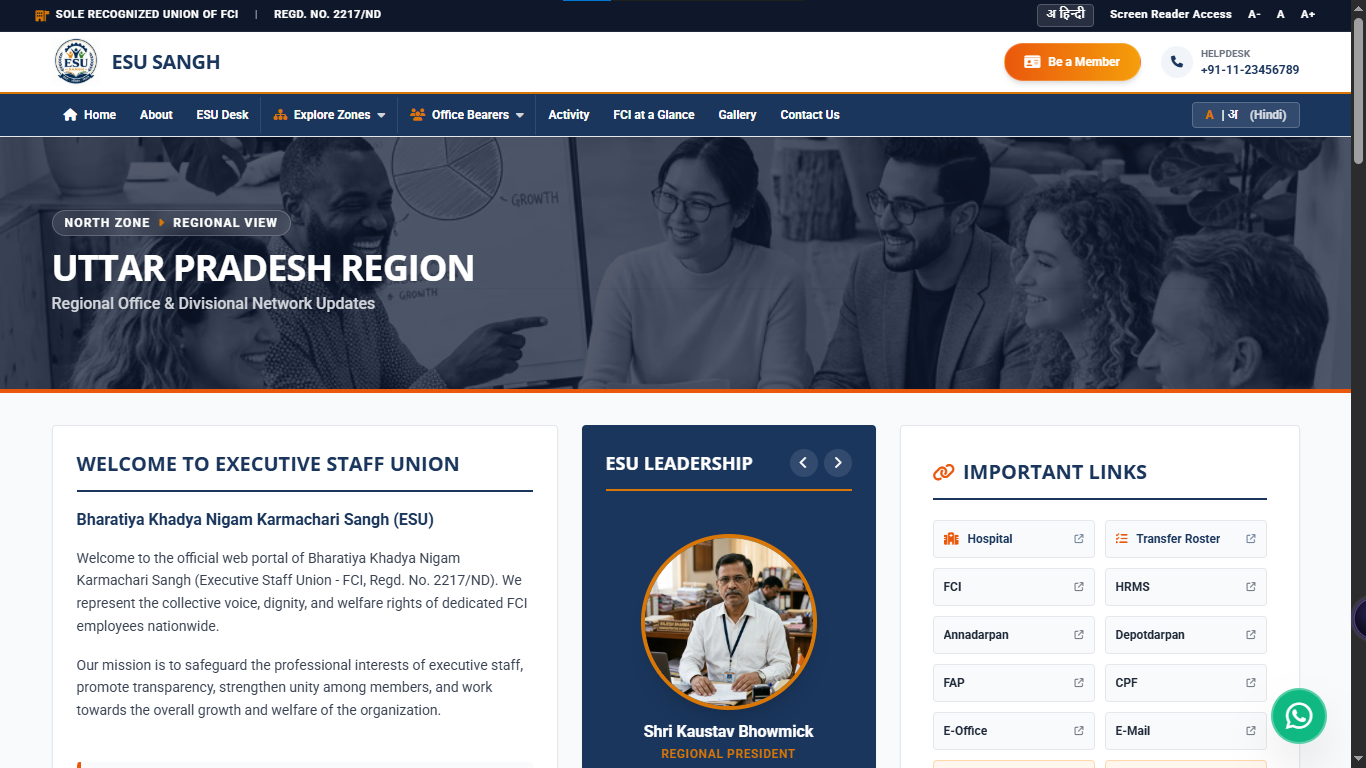
6. Real Production Case Study: ESU Sangh FCI National Portal
For the Bharatiya Khadya Nigam Karmachari Sangh (ESU Sangh), representing Food Corporation of India executive staff across India, managing member circulars, committee appointments, and regional communication across dozens of states manually was slowing down leadership.
• Bilingual Portal & Admin Center: Complete Hindi and English administrative interface for regional committee leaders.
• Granular Document Archival: Instant PDF circular publishing with categorized tags, circular numbers, and tamper-proof verification.
• National Executive Directory: Searchable database of regional union representatives across North, South, East, West, and Headquarters zones.
7. The Tech Stack We Use for Enterprise Reliability
We build modern, secure, and lightning-fast custom dashboards using industry-standard enterprise technologies:
- Frontend: Next.js 15, React, Tailwind CSS, TanStack Table (sub-millisecond virtualized sorting of 50,000+ rows).
- Backend API: Node.js / Express or Python FastAPI with JWT authentication and HTTP-only secure cookie sessions.
- Database: PostgreSQL (via Supabase or Neon) or MongoDB with strict schema validation and indexed query optimization.
- Security: CSRF protection, rate limiting, and encrypted password hashing with Argon2/bcrypt.
8. Frequently Asked Questions
Can we integrate our existing customer database or Excel files?
Yes. We write custom automated migration scripts to clean, normalize, and import your existing Excel, CSV, or legacy SQL database into your new custom dashboard without any loss of historical records.
Can the dashboard send automated WhatsApp notifications to customers?
Yes. We integrate official WhatsApp Business Cloud APIs so that whenever your team updates an order or books an appointment on the dashboard, the customer automatically receives a WhatsApp confirmation with live status links.
Who owns the source code of the custom dashboard?
You own 100% of the entire source code repository on GitHub, all database schemas, and your cloud hosting accounts. There are zero licensing lock-ins.
Ready to Streamline Your Business Operations?
Message developer Ajay Upadhyay directly on WhatsApp to map out your custom dashboard requirements and get a fixed-price proposal.